
Pilot Programme
Prove Every Clean.
Your cleaners clock in on site, even in the basement, and your clients see the evidence for themselves.
Built for commercial cleaning contractors.
Staff web portal · client portal · Mobile App for iOS and Android (pilot access). Early product, offered as a pilot with close hands-on support.
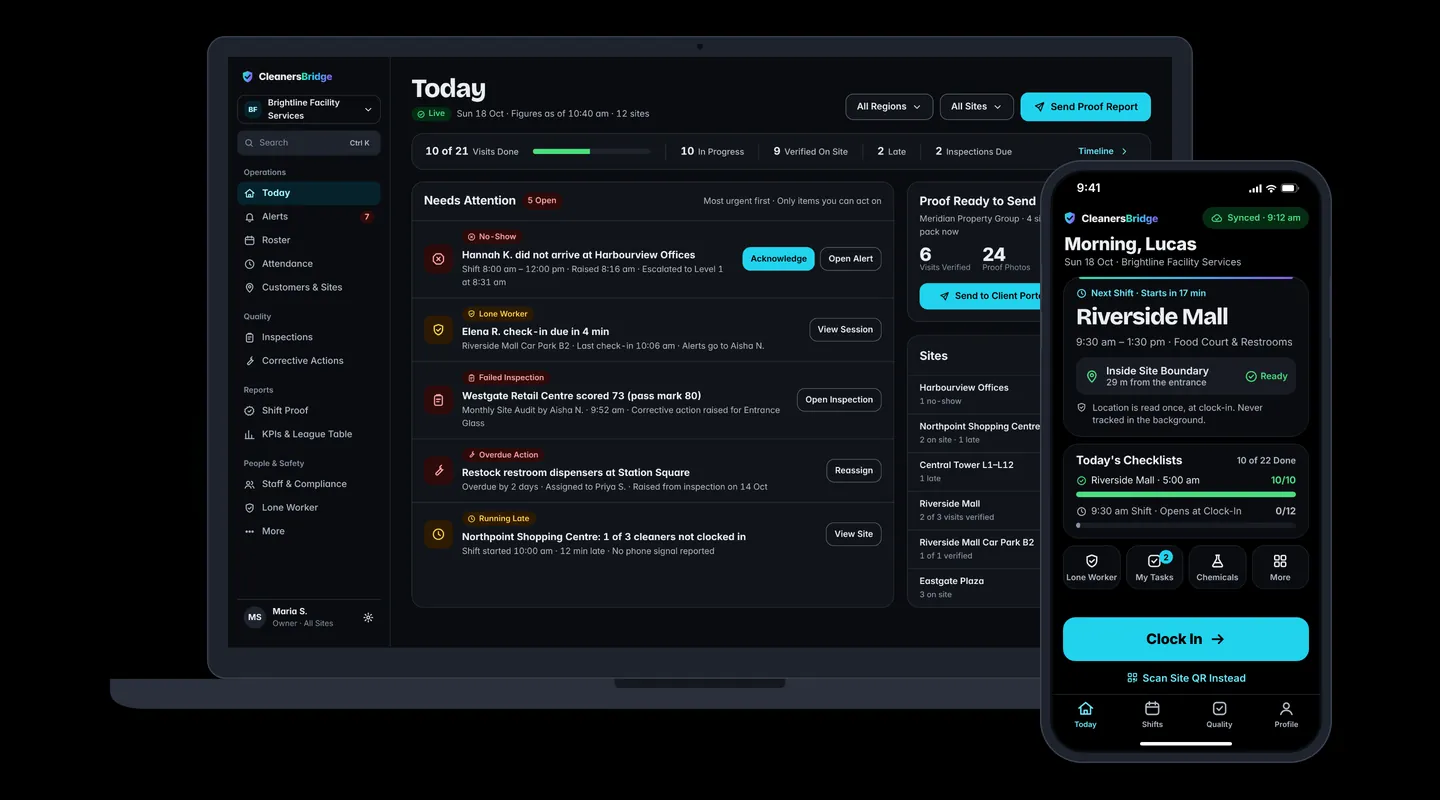
One Platform, Three Surfaces
The Contractor Runs the Work. The Client Sees the Proof.
One platform shared by cleaning contractors and the companies that hire them. Company and site access is enforced in the database itself and tested automatically for cross-company leaks.
Staff Web Portal
For owners, admins, operations and area managers: the Today dashboard, roster, attendance, quality, compliance and reports. Light and dark themes.
Live today
Client Portal
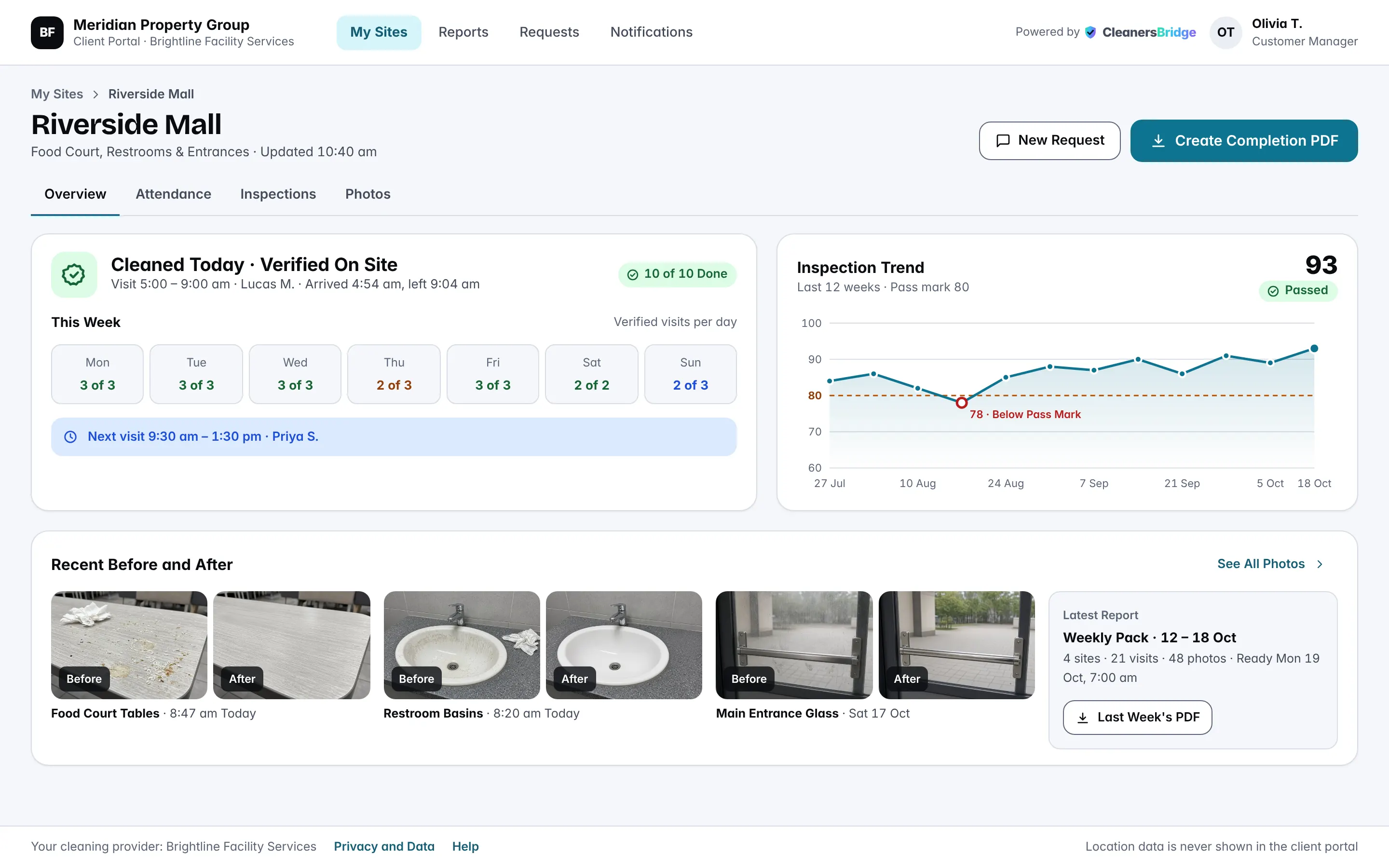
For your clients' facility, property and retail managers: their own sites only, every visit, inspections, before-and-after photos and a self-serve completion report.
Live today
Mobile App
For cleaners, supervisors and subcontractor crews. One Mobile App for every field role on iOS and Android. Every field action is saved on the phone first, then sent in order when signal returns.
- Roster published
- Clock in by GPS or QR
- Saved offline, synced later
- Checklist with photos
- Late? Supervisor alerted
- Scored inspection
- Fix closed with a photo
- Client sees the evidence
- Report packs on schedule
Product Walkthrough
From Roster to Report.
What CleanersBridge does today, scene by scene.


Roster
Apply templates or copy last week, drag people on, and see warnings (not cleared for the site, short rest, understaffed) before you publish. Workers get it on their phone.
GPS Clock-In
One location fix at clock-in, an on-screen verdict, and a confirmation the cleaner can see. Outside the boundary? It can still clock in, but it's flagged for review.
No Signal
No signal in the basement? Scan the signed site QR poster. The clock-in is saved on the phone with its original time and syncs when the signal returns (offline clock events are accepted up to 72 hours old).
Checklists by Area
Checklists by area, with “photo needed” and before-and-after items. Fully offline: every tick and photo is saved on the phone first, then sent in order.
The Today Dashboard
Every site at a glance in red, amber, green and grey. An exception sweep runs every minute: late, no-show, unfilled, missed clock-out. If nobody acknowledges an alert, it escalates.
Inspections and Fixes
Scored on the phone against the client's pass mark. A failed item becomes a fix with a due date; it can't be closed without an After photo, and someone else verifies it.
Shift Proof
One row per visit. Open the evidence panel: scheduled versus clocked times, clock method and result, geofence, offline capture, checklist items and photos.
The Client Portal
Your client sees their own sites only, every visit on a calendar marked “verified on site”, and downloads a completion report branded with your logo, without asking anyone.
Live Today
Proof of Service, End to End.
Every capability below is built, tested and in the product today. Each one answers one problem you already have.
Clock-In That Proves They Were on Site
“Your cleaners clock in on site, and the phone confirms they're inside the site boundary.”
- One foreground location fix with an on-screen verdict: inside the boundary, outside, weak GPS or no fix.
- A circular geofence for each site (default 100 m, 25 to 2,000 m) with an allowance for GPS accuracy.
- Suspicious clock-ins (outside the boundary, fake location on Android, phone clock skew) are flagged for review, never silently accepted or rejected.


Live
Basements, Car Parks, Plant Rooms: No Signal, No Problem
“No GPS in the car park? Scan the site's QR poster and you're clocked in.”
- Signed site QR posters. Rotate a site's key and every older print stops working.
- Every field action is saved on the phone first, sent in order when online, never duplicated and never dropped.
- Offline clock-ins keep the device time and the server time, and are accepted up to 72 hours old.
- Someone clocked in underground isn't wrongly marked a no-show: the alert clears itself when the clock-in syncs.



Live
Stop Ringing Round Every Morning
“CleanersBridge tells your supervisors only who's late, missing or still clocked in.”
- An exception sweep runs every minute: late, no-show, unfilled shift, missed clock-out.
- Unacknowledged alerts escalate: supervisor first, the manager 15 minutes later, then admins and the owner 30 minutes after that. Timings are configurable per organisation.
- Muting a channel never stops escalation, and quiet hours never delay a no-show alert.


Live
Inspections That Lead to Fixes, with Photo Proof
“A failed inspection item becomes a fix with a due date, and it can't be closed without a photo.”
- Scored inspections on the phone, fully offline: weighted items, critical items, and the pass mark you agreed with each client.
- Corrective actions move from Open to In progress, to Fixed (After photo required), to Verified by someone other than the fixer, to Closed.
- Overdue fixes alert the supervisor automatically. You decide which inspections each client sees; internal notes never reach them.

Live
Shift Proof for Disputes and Tenders
“When a client says you weren't there, can you show the clock-in, the checklist and the photos for that one visit?”
- One row per visit with clock method, on-site tick, offline icon, checklist completion and photo count.
- The evidence panel shows scheduled versus clocked times, method and result, geofence, offline capture, checklist items and photos.
- Corrections never overwrite the original: adjustments are permanent records with a reason and an author.

Live
A Client Portal That Answers “Did It Happen?”
“See every cleaning visit at your sites, verified on site, without asking your contractor.”
- “My sites” with today's status, visits done today and the last inspection score against the pass mark.
- An attendance calendar with each visit marked “verified on site”, shared inspections from the last 90 days, and before-and-after photo pairs.
- A self-serve completion report, branded with the contractor's logo, for up to 93 days and 24 photos.
- Clients never see GPS coordinates, internal notes or full surnames. Two clients never see each other's data.
72h
72 Hours
Offline clock events accepted up to 72 hours old
100m
100 Metre Circle
Default geofence circle (25 to 2,000 m)
2s
2-Second Hold
Panic hold in lone-worker sessions
30·14·7·0
Certificate Reminders
Certificate reminders, days before expiry
93 days
93-Day Reports
Report range, with up to 24 photos per PDF
Roster and Publish
A weekly grid with drag-and-drop, shift templates and “copy previous week”. Warnings for uncleared workers, short rest and understaffing before you publish. Workers get it on their phone.
Today Dashboard
One screen for every site you run today: red, amber, green and grey, always with an icon and a word. Overview, timeline and map views, plus a KPI page and a site league table.
Scheduled Report Packs
Weekly or monthly PDF packs per client, rendered on schedule and listed in each recipient's Reports page, with a “Your cleaning report is ready” notice in-app and by email.
Service Requests to Fixes
Clients raise requests with up to 5 photos. Your team triages them and can convert one into a corrective action; the client follows its status through to the fix photos.
Lone-Worker Check-Ins
“I'm OK” check-ins on a timer for shifts flagged lone worker. A missed check-in alarms the supervisor and escalates. Panic is a 2-second hold, with immediate call options. Live board in the portal.
Site Requirements and Certificates
Set the inductions and certificates each site needs. The roster warns when someone isn't cleared, and a nightly re-check catches certificates that lapse after the roster was built.
SDS Offline on the Phone
Safety data sheets for every chemical at the site, readable with no signal. Alerts when a site's SDS is missing or out of date, and a printable hazardous substance register for each site.
Built for Real Field Teams
Cleaners are invited by mobile number and unlock with a 6-digit PIN or fingerprint; no email needed. Shared phones keep each person's work separate. Bulk invite up to 50 people at once.
Subcontractor Crews, in View
Subcontractor managers and workers use the same app and see only their own people and sites. Their insurance and induction items are tracked with expiry alerts.
Who It's For
Contractors, Facility Teams and the Clients Who Hire Them.
Commercial Cleaning Contractors
Proving attendance to clients, managing by exception across regions, consistent quality, and evidence for tenders and disputes.
Facility Management Companies
Proving service to your own clients, supervising subcontracted crews, and running inspections across many sites.
Subcontractor Networks
Seeing whether subcontracted crews turned up, keeping their compliance items current, and keeping their data separate.
Property, Retail, Education, Transport and Public-Sector Buyers
See every visit at your sites without asking your contractor, and make proof of service part of your cleaning contracts.
Every Site on Its Own Time
Time zones for each organisation and each site, so “today” is right at every site you clean.
Local Formats
Local date, time and money formats from your organisation's locale, any currency, and phone numbers in any country's format for SMS invites.
Emergency Numbers by Country
Lone-worker call options follow the country: 000 in Australia, 111 in New Zealand, 911 in the US and Canada, 999 in the UK, 112 in Ireland and the EU.
Privacy and AI
Proof Without Surveillance.
Staff and unions ask hard questions about location. So do clients' procurement and IT teams. Here are the straight answers.
Location Privacy
“We record where and when, once. We never track people.”
In CleanersBridge, location is read only at clock-in, clock-out and lone-worker check-ins; workers are never tracked in the background.
- Photos never carry location, and the app has no microphone permission.
- Clients never see GPS coordinates, distances or clock-event details, and never full surnames.
- Two clients of the same contractor never see each other's data.
- Company and site access is enforced in the database itself and tested automatically for cross-company leaks.
- Invite-only accounts. Office staff sign in with Microsoft or Google work accounts, so your existing MFA applies.
- No visa, tax, bank, date-of-birth or health data is stored.
AI Today
AI only drafts. A person approves.
Meeting minutes turn into draft action items that a manager approves; assignee suggestions come with a plain-English explanation. Personal details are removed before anything goes to the AI, spending is capped, and AI can be switched off.
- Approved action items become tasks, and the assignee is notified.
- Assignee suggestions follow a transparent rule (role, workload, site familiarity, nearby shifts); the AI only explains the reasons.
- If personal details can't be confirmed as removed, nothing is sent.
- CleanersBridge doesn't score or rank workers with AI.
Pilot Programme
See It on Your Own Sites, with Our Team.
CleanersBridge is an early product, offered as a pilot with close hands-on support. Every session is run live by our team and tailored to your sites.
Step 1
A Live Session
About 20 minutes: a site with its geofence and QR poster, the roster, clock-ins by GPS and by QR with no signal, a no-show escalating, an inspection and fix, then your client's view.
Step 2
A 30-Day Demo Tenant
A full demo company with your own branding, set up by us, so your team can explore it.
Step 3
A Tailored Pilot
Tell us your headcount, sites and the modules you care about, and shape a pilot around them.
Sessions are booked via info@cleanersbridge.com.